
Forum Replies Created
-
AuthorPosts
-
Pete Wlodkowski
ParticipantHi Anh,
Quick question. I've set up individual groups for multiple years (2006 - 2019), but it is very slow:

Here is my working code for the multi years, wondering if there is a better way to write it so it is quicker. Like I said, this is slow. It's taking forever to load the edit Tournament (edit post).
https://ghostbin.com/paste/ejjhy
Thought maybe the multi year functions could be grouped... just wasn't sure. Thought I'd send you a message. Thank you!
ParticipantAnh Tran, you are awesome my friend. I send a lot of gratitude and karma your way! You deserve it. Thank you for helping me on this. Happy Holiday.
ParticipantTO show you the back-end, post edit screen.... I'm trying to get the tournament points to populate the points select dropdown:
 Participant
Okay, great, so I have this set up - I rebuild the fields I want to use for my dropdown options in Meta Box instead of ACF.

So, the fields I want to use for the Points dropdown are:
W
RU
T5
T10
T15
T20
T30
T40My code is below:
https://ghostbin.com/paste/9gg73
Is it still basically the same to populate the points dropdown options...
I tried to modify the snippet you sent to this:
$options = array(
        'w' => get_r_points_table( $post_id, 'points_w', true ),
        'ru' => get_r_points_table( $post_id, 'points_ru', true ),
        // and so on.
    );

                    array (
                        'id' => 'ppoints',
                        'name' => 'Points',
                        'type' => 'select',
                        'placeholder' => 'Select an Item',
                        'options' => $options,
                        'columns' => 1,
                    ),
But it came up empty...
Thank you for your assistance!
This plugin is so great. I realize the limits to what I can build in WordPress are much broader now.
Thank you.
ParticipantSo, I'm assuming I can use the builder, copy the code, edit it, paste the code into functions, and deactivate the builder? Is that a correct flow?
ParticipantOh, okay, I found the code tab. Thank you!
ParticipantThank you very much for getting back to me.
Okay, so I can't use the builder at all? Can I convert what I have built to code and modify that?
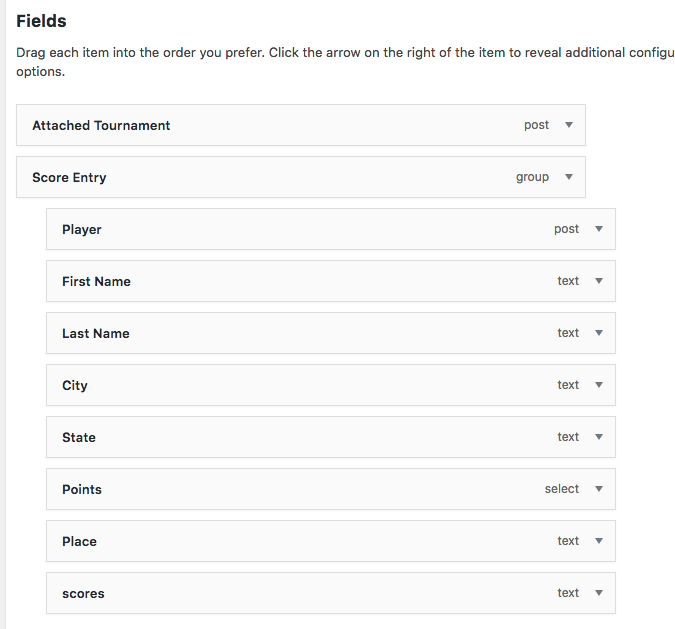 Participant
Here is the PHP to show my custom fields:
<?php the_field( 'w' ); ?>
<?php the_field( 'ru' ); ?>
<?php the_field( 't5s' ); ?>
<?php the_field( 't10q' ); ?>
<?php the_field( 't1516' ); ?>
<?php the_field( 't20' ); ?>
<?php the_field( 't3032' ); ?>
<?php the_field( 't40' ); ?>This is what I want to populate my select options with.
ParticipantBy the way, I used the meta box builder to create the select field.
December 6, 2018 at 8:02 AM in reply to: ✅404 Error on Edit Post Screen when Meta Box Assigned to CPT #12511ParticipantI solved it. I deactivated Toolset Types, activated Meta Box Custom Post Types (free), created CPTs with the same singular and plural naming conventions, and they showed up again. Plus it kept all my custom posts!
December 6, 2018 at 7:45 AM in reply to: ✅404 Error on Edit Post Screen when Meta Box Assigned to CPT #12510ParticipantIS Meta Box compatible with Toolset fields?
December 6, 2018 at 7:41 AM in reply to: ✅404 Error on Edit Post Screen when Meta Box Assigned to CPT #12509ParticipantI've got a group, and under it, a post select for another CPT.
December 6, 2018 at 7:33 AM in reply to: ✅404 Error on Edit Post Screen when Meta Box Assigned to CPT #12508ParticipantI narrowed it down to the MB Builder, using the AIO settings....
So, whenever the builder is active, and fields in it are assigned to my CPT, I get a 404 whenever I try to edit one of my custom posts...
Please advise. Thank you.
-
AuthorPosts