Forum Replies Created
-
AuthorPosts
-
November 22, 2023 at 8:24 PM in reply to: ✅How to allow adding more choices for Checkbox List fields on Dashboard? #43880
[email protected]
ParticipantThat's too bad 🙁 Like really really bad ...
Can you recommend on another solution or workaround, which allows editors to add choices?
April 27, 2023 at 9:28 PM in reply to: ✅How to make a post of a CPT sticky in DASHBOARD (not frontend)? #41637ParticipantCan you tell me, how to make it sticky in backend AND frontend? The code/link you provided is out of my capacity
November 25, 2022 at 6:20 PM in reply to: ✅How to make a download-button from "File Upload" field? #39318ParticipantHey there,
I don't use any pagebuilders. Kadence Blocks is a Gutenberg Block Library. can you help me?
Thank you in advance and kind regards,
SaschaNovember 23, 2022 at 4:55 AM in reply to: ✅How to make a download-button from "File Upload" field? #39280ParticipantI'm not using the Kadence-Block, but GenerateBlocks. All other MB-fields are being displayed properly, only need to make the file-upload downloadable. How? The doc is a bit too technical for me to recreate on this site.
Thank you in advance and kind regards,
SaschaOctober 1, 2022 at 5:01 PM in reply to: ✅"Cannot use empty array elements in arrays" after adding code from Generator #38499ParticipantWell, I think I found the problem's origin:
When I chose "Pages" and disable "Posts" in the Generator Post-Types-Tab, the syntax of the register-action (or array) seems broken. This is the output:
register_taxonomy( 'pagescat', [ ,'page' ], $args );but instead it should be
register_taxonomy( 'pagescat', ['page' ], $args );Am I correct? Please note that I'm not a developer …
Maybe a bug in the Taxonomie Generator?
Thank you in advance and kind regards,
SaschaParticipantThanks for further clarification, that was helpful indeed.
So in this example, I would replace the
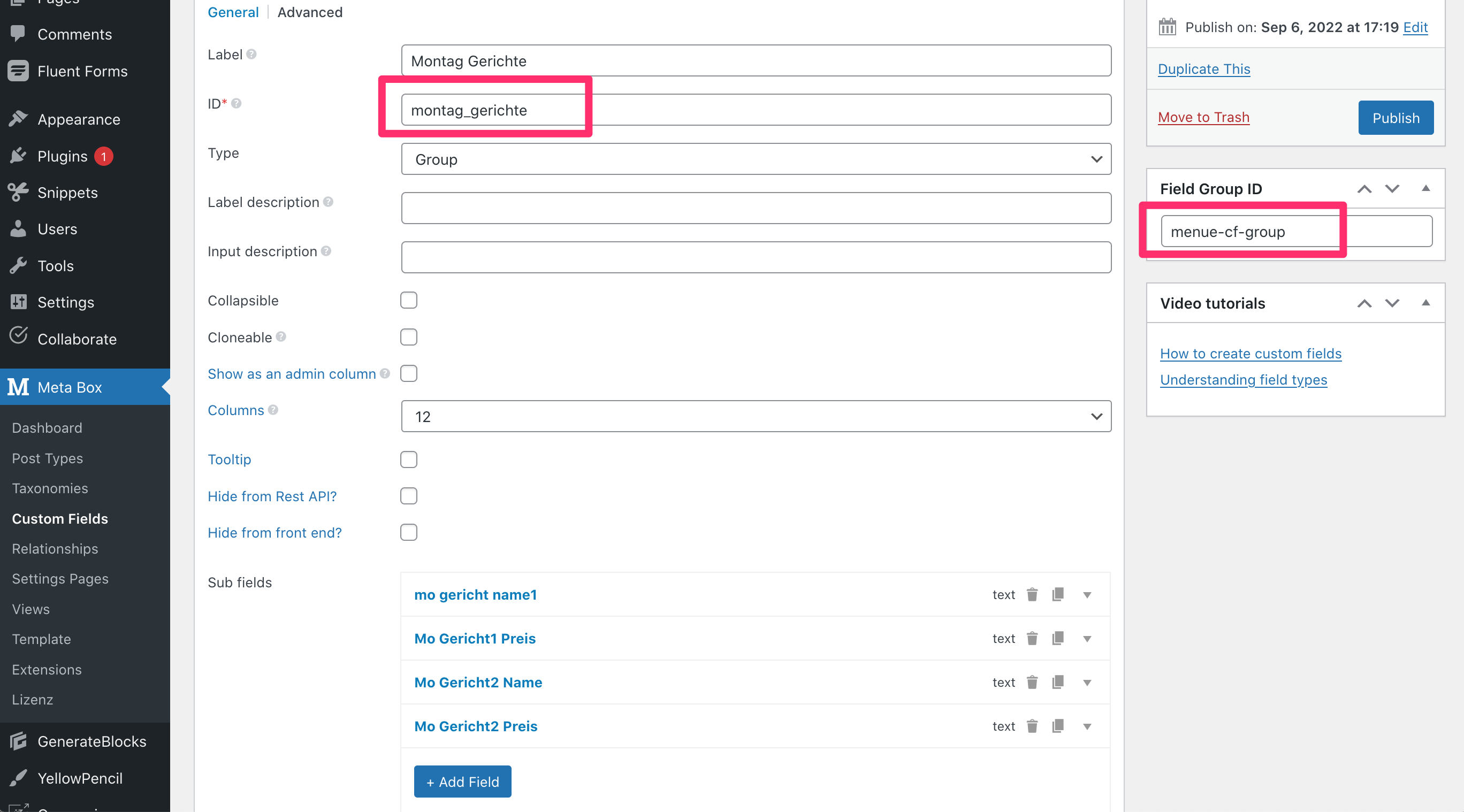
group_field_idwithmontag_gerichte, if the group is created like seen on this screenshot? Or is it the IDmenue-cf-group?Thank you in advance and kind regards,
SaschaParticipantHello,
thank you for your reply.
Unfortunately, I'm not a coder, so I wonder if you can help me further here?
The docs seem to include code, but not all of it seems to be required if MetaBox AIO is installed, correct? The doc you've mentioned explains how to create the group, subfields etc. But I have already created the group using the Metabox UI in the dashboard of the site. Therefore they're displayed in the block-editor already and can be filled by admins, editors etc., correct?
In my understanding, as soon as the MB Group is created, I can display all fields in the frontend using shortcodes. I just don't understand, how to display these fields via shortcode. The docs are confusing for me 🙈
Can you please show me or provide the shortcode to display the cloneable subfields mentioned above?
Thank you in advance and kind regards,
SaschaParticipantThanks! So how to find out the other IDs?
ParticipantI also would like to hear about this
ParticipantHi, probably I was not able to explain the requirements properly.
I need to display the user custom-fields which I have created with metabox in the frontend. I feel very lost from your replies.
I also would like to display all users on one page in frontend including their metabox-custom-user-fields. How?
ParticipantCould you please provide an integration with Ultimate Members and/or UsersWP? These are the best plugins for showing user-profiles and allow editing. The can show several user-meta fields, such as "Biography", "Gender" etc., but not from metabox.
Or is there a way to save metabox custom fields for users as standard user-meta?
ParticipantI have also tried to connect several membership plugins:
Ultimate Member
UsersWP
ProfilePress
ProfileGrid
WP User Manager
Profile Builder NOX
User Registration NOX
WP User Frontend
UserProand tried to configure them to display the custom fields created with metabox. It did not work and I'm now HIGHLY frustrated.
ParticipantI also have trouble with setting up user profiles. It starts with the creation of the Registration form. I have followed both the article and the docs, but it didn't help on my site.
As you can see on this screenshot, the shortcode applied there should display the default registration fields (username, email, passwordx2), but it shows only blank space on the front end:
[mb_user_profile_register id="" label_submit="Register" confirmation="Your account has been created successfully."]I have checked settings and also deactivated other plugins. I have also switched the theme (kadence) to other themes (2021 and 2019), but same result on the page.
any idea about how to further troubleshoot this? Did I apply the wrong shortcode?
Thank you in advance and kind regards,
SaschaParticipantThis would be really useful
May 2, 2021 at 9:55 PM in reply to: ✅Shortcodes - integration with Gutenberg, and how to use them inside a link #27829ParticipantOne more thing: I have created CF and now I'm able to display them on a post.
I have now realised, when placing the shortcude inside a group, the CF will be displayed within the templates layout. but as soon as I place the shortcode between 2 default paragraph blocks, the CF will be displayed at the very left border of the page, not within the content section of the page-template:
https://adhesiveknife.tastewp.com/2021/04/19/officia-expedita-et-ipsa-eaque/
CFs are:
author = "Peter Lustig"
year = "1999"Here a screenshot from the editor:
http://media.macbay.de/_support/asdiuvsdgf_263EF49F.pngAny chance to help me further with this?
Thanks in advance and have a lovely day 🙂
Sascha
-
AuthorPosts