Forum Replies Created
-
AuthorPosts
-
February 24, 2023 at 7:45 PM in reply to: Disable adding a new post, just get the input values #40717
Jose Pontvianne
ParticipantThanks Peter, it will be awesome.
In our website we let our users to make a qr, so we use a workaround making "rwmb_frontend_validate" to always fail, but, asi I said, an elegant solution is needed 🙂
 February 24, 2023 at 4:11 PM in reply to: Disable adding a new post, just get the input values #40706Participant
I was reading this workaround:
https://support.metabox.io/topic/prevent-metabox-form-creating-a-new-post/But what we are looking for is and option like [mb_frontend_form id="dummy" add="disable"]
A clean solution in a simple word, because your field rendering is awesome but there is more than creating a post needs
thanks again!
November 22, 2022 at 4:30 PM in reply to: ✅Metabox Admin menu does not appear after plugin activation #39266ParticipantThank you very much Anh.
November 22, 2022 at 2:53 AM in reply to: ✅Metabox Admin menu does not appear after plugin activation #39258ParticipantAnh,
of course.
Stay safe.Best regards
November 21, 2022 at 8:59 PM in reply to: ✅Metabox Admin menu does not appear after plugin activation #39245ParticipantDear Anh,
could you please give us a solution?
We need to keep working in our project using Metabox.Best regards
November 20, 2022 at 4:27 PM in reply to: ✅Metabox Admin menu does not appear after plugin activation #39232ParticipantDear Metabox team,
one week after my purchase, after been explaining the issue, we are still not be able to download the purchased bundle.
I'm asking for a solution in this issue, as my team and I needs to keep working in our projects.
Please let us know how to proceed.
best regards
November 17, 2022 at 3:21 PM in reply to: ✅Metabox Admin menu does not appear after plugin activation #39186ParticipantDear Anh,
it's been almost FIVE days since I have reported the problem.
And the problem is simple: I have purchased a Bundle and in "my account" does not appear that purchase.The purchase has been done by me, with my own email, using my own PayPal account, the same email that I am using to write here in your forum.
So please ask your system where are my purchase, and please, review expiration date as we can not already use it.
Thank you very much
Best regardsParticipantHi,
take a look at my post, maybe it's the same, 4 days wating here...
https://support.metabox.io/topic/metabox-admin-menu-does-not-appear-after-plugin-activation/
November 16, 2022 at 10:10 PM in reply to: ✅Metabox Admin menu does not appear after plugin activation #39173Participantmmm yep?
The same that purchased your product, as you can see in the email received:
Hi Jose Pontvianne, Thank you for purchasing MB Builder. Please log in to your account to download the product and get the license key: Account page: https://metabox.io/my-account/ Email: jo***.pontvia***@gmail.com Password: your existing password. If you forget it, please reset here Best regards, Meta BoxNovember 15, 2022 at 11:35 PM in reply to: ✅Metabox Admin menu does not appear after plugin activation #39154ParticipantHi Anh,
Sorry to bother you, but no 🙂
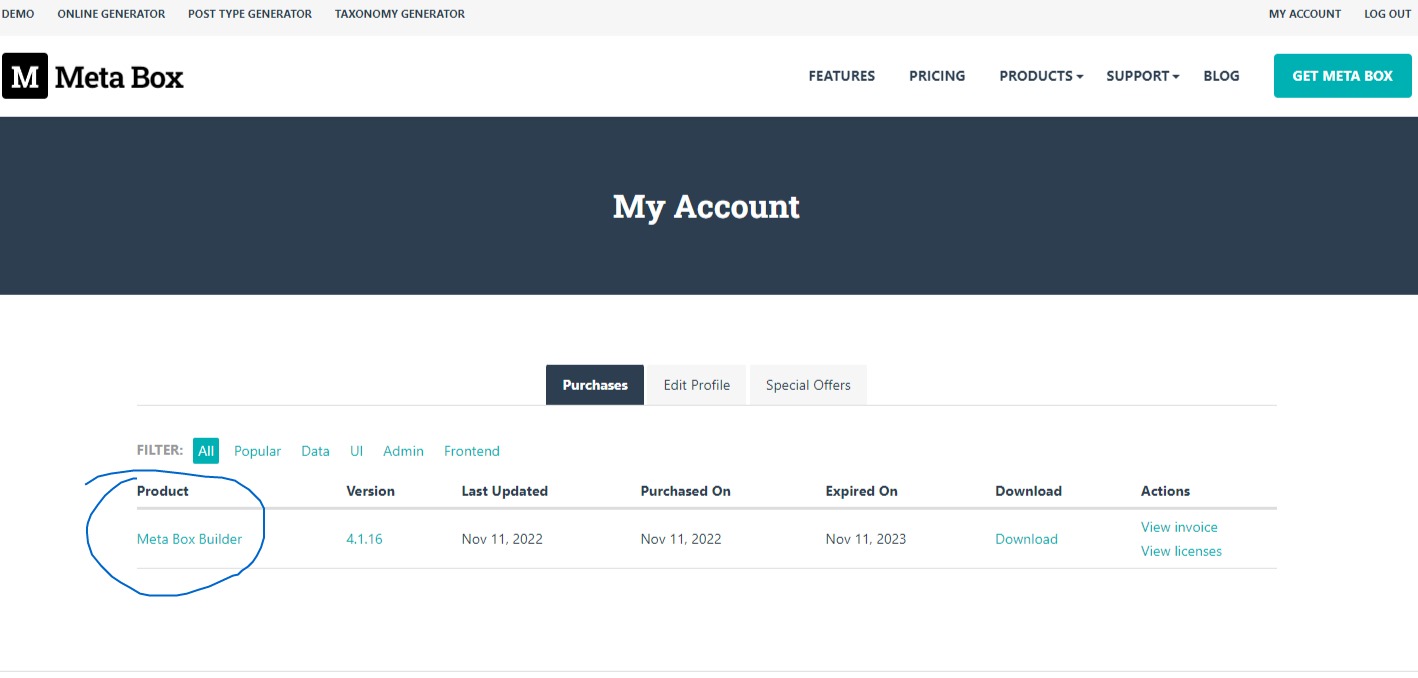
*** https://storage.googleapis.com/openscreenshot/t%2F-%2Fq/WqCMNRq-t.pngWe only can see Metabox Builder in "my account"
November 15, 2022 at 9:21 PM in reply to: ✅Metabox Admin menu does not appear after plugin activation #39143ParticipantThank you very much
November 14, 2022 at 10:58 PM in reply to: ✅Metabox Admin menu does not appear after plugin activation #39133ParticipantPeter,
thanks for your detailed info.
Just one thing:
Where is the download link to the extensions included in our purchase?
"MB Builder is a boundle with 12 PRO extensions included"In "My Account page" we only see "MB Builder" as we mention.
Thanks!
November 14, 2022 at 2:54 PM in reply to: ✅Metabox Admin menu does not appear after plugin activation #39121ParticipantOk Peter,
when you say "activate" you are saying that we need to install another plugin, because no indication is shown in "Matabox Builder" (please...)
So, if I need to use Metabox, I need to:
- Install Metabox Builder
- Setup its license
- Install Metabox pluginOk, and, as Metabox Builder is a boundle, for love of god hahah WHERE we can dowload the rest of the plugins?
You say this is a regular way?
Please, we are in production team, no time for puzzles.Thank you very much
Best regardsNovember 13, 2022 at 11:03 PM in reply to: ✅Metabox Admin menu does not appear after plugin activation #39117ParticipantHi Peter,
"activate" you mean the standard action "activate plugin" of WordPress?
We do not see any other action in the plugin itself or in "Manage licenses" in your website, where we only can "regenerate" a key.Thanks!
-
AuthorPosts