Forum Replies Created
-
AuthorPosts
-
@mindspark
Participantany updates here?
Participantany updates here?
ParticipantAnh -
think I've missed something....
This is my code:
add_action( 'mb_relationships_init', function() {
    MB_Relationships_API::register( array(
        'id'   => 'posts_to_pages',
        'from' => 'session-sponsor',
        'to'   => 'session',
    ) );
    MB_Relationships_API::register( array(
        'from' => 'speaker',
        'to'   => 'session',
    ) );

} );
and
add_action( 'mb_relationships_init', function() {
MB_Relationships_API::register( array(
    'id'   => 'posts_to_pages',
    'from' => array(
    'object_type'  => 'post',
    'post_type'  => 'session-sponsor',
    'admin_column' => 'true',  // THIS!
    'title'      => 'Sponsor',
    ),
    'to'   => array(
    'object_type'  => 'post',
    'post_type'    => 'session',
    'admin_column' => 'after title', // THIS!
    'title'      => 'Sponsor',
    ),
) );
    MB_Relationships_API::register( array(
    'from' => array(
    'object_type'  => 'post',
    'post_type'  => 'speaker',
    'admin_column' => 'true',  // THIS!
    'title'      => 'Sponsor',
    ),
    'to'   => array(
    'object_type'  => 'post',
    'post_type'    => 'session',
    'admin_column' => 'after title', // THIS!
    'title'      => 'Speaker',
    ),
) );

} );
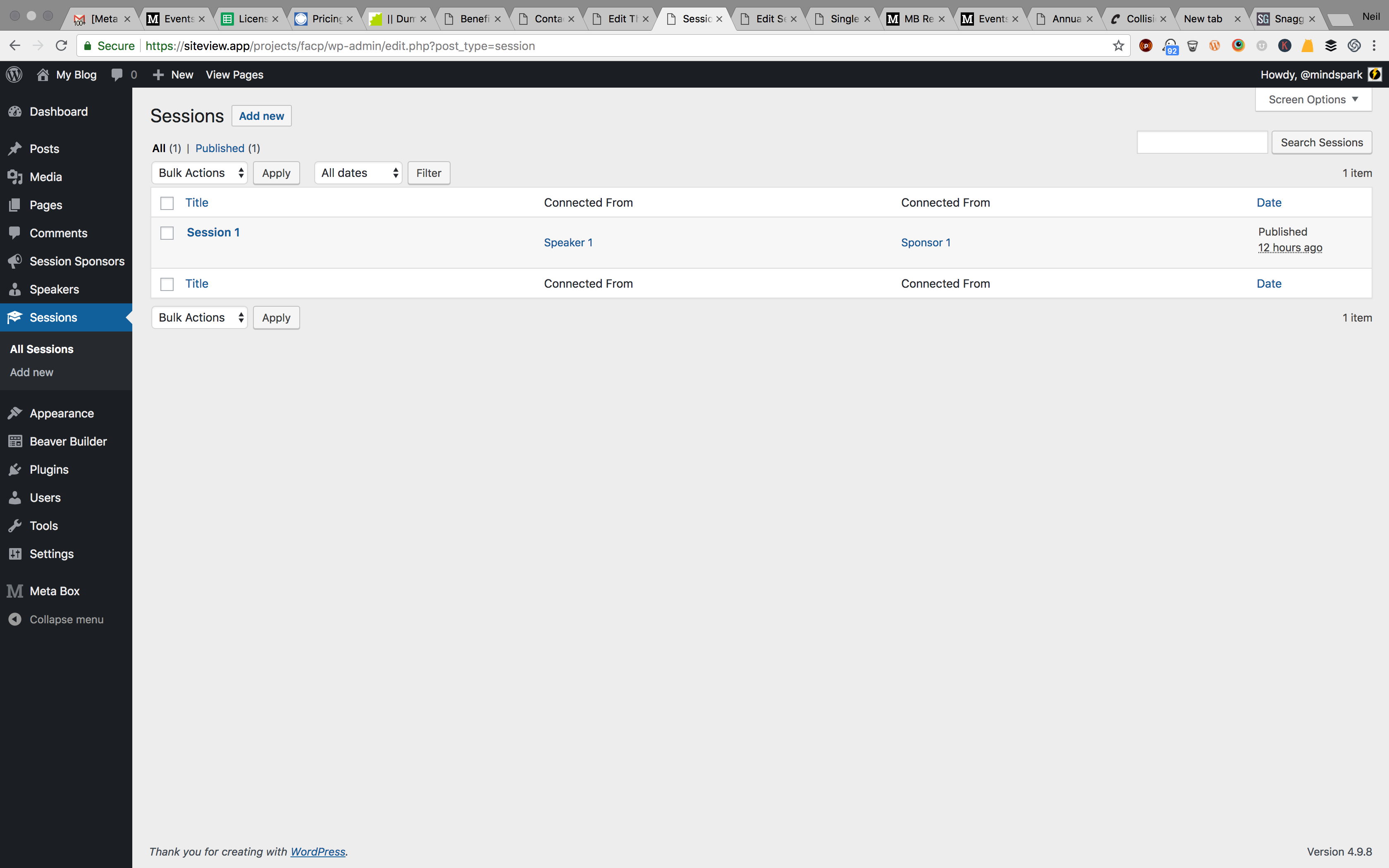
So inside the CPT area - the boxes remain titled 'Connects To' and 'Connects From'. Also, in the all posts page - the title isn't changed there either.
I think I may not understand what I need to do here. My goal is to change the 'Connects From' title to 'Speakers' and the 'Connects To' title to 'Sponsors'. Is this possible?
Participantawesome!
Participantthanks!
Participantyes - but I need to display both the Post title / link and the custom field data side-by-side
your themer integration doesn't allow for inline text so I have to use your shortcode... which doesn't explain how I can display the post title from your plugin.
the BB shortcodes dont grab metabox custom fields, so I need both on a single line.... make sense?
Participantit worked!
quick follow up...
- im assuming I can add relationships? example - EVENTS can relate to both VENUES and TICKETS?
-
after adding the code snippet above, a new box appears in the EVENT cpt. how can I change the box title?
🙂
ParticipantThanks for the assist!
ParticipantGot it thx!
Once I add this code, will I be able to add the related cpts?
I mean when creating a new event, will I be able to add an existing venue and if so where will I be able to do that? Via a field drop down,etc?
Thx!
July 3, 2018 at 8:47 PM in reply to: ✅How to use conditional logic and then display custom meta on a page. #10431ParticipantThanks Anh. I'll let you know how it turns out.
July 3, 2018 at 12:23 AM in reply to: ✅How to use conditional logic and then display custom meta on a page. #10414ParticipantIt just occured to me that I may need to share more info about my project. See below:
My People CPT are attorneys. there are about 18 meta fields in use to collect info on each Person that will be used to display when users visit the Profile page.
most info is simple data, but, the People have a few custom items. this work is to make it easy for client to add their own new employees and then to ensure the right info is being displayed on the front end -
if People work in Tampa, I need to display the Tampa address
if People work in St. Pete, I need to display the St. Pete addressalso, each of the People CPT are authors for various blog articles, so we are using the Co-Authors plugin to handle that. this is important to mention because in addition to the profile info displayed for each attorney, we also need to display all articles attributed to them.
here is a URL to the live site (uses WCK and a ton of custom code) which we are replicating using MEtaBox - https://www.trenam.com/people-list/paul-d-bain/
July 3, 2018 at 12:16 AM in reply to: ✅How to use conditional logic and then display custom meta on a page. #10413ParticipantYes Tampa and St Pete are taxonomies assigned to CPT People. thanks for help with the script....
quick follow up -
I'm also using Beaver Themer addon and Astra theme. I know that the Themer addon makes this a bit easier, but I need to add leading text before custom meta is displayed in same row - example:
Direct Line: [custom meta field PHONE NUMBER].
So am I able to add the snippet you helped with into a text box or HTML module? or do I need something more advanced to run PHP inside a page or widget?
thanks!
ParticipantActually, I don't think I need the tools as I thought. I'm happy to explain why:
I'm building a site that needs expanded user profile inside WP Admin. These profiles are to be displayed on the front end so applicable users can make edits / complete their profiles fully. Obviously your plugins handle all of that.
I originally created the profiles as custom post types (Physicians).
I happen to use Toolset Types for CPT work. It's pretty easy and, it INTEGRATES WITH BEAVER BUILDER page builder plugin.
Then the client asked to have the profiles as user profiles, not CPTs - that's what lead me to look for a solution and I found you!
What I didn't know was that Toolset Types also allows me to create custom user meta and then display that on the front end.
So now I'm thinking that purchasing your product was actually duplicative for me. So then I checked out your add-ons. There are many! But then I started thinking about how many plugins are needed just to do simple things like have a settings page in the WP dashboard, or another add-on to make use of a form builder, etc. You get the idea. In order to use your product as an alternative to Toolset, I would need to install 6-8 plugins... For me, that's a ton - and I happen to try to limit plugins to a total of 10 for an entire project.
With all of that said, I'm just not sure if this will be the best option for me.
But, I do have a question - you happen to provide an online code builder.... which allows for the creation of CPTs and related items without needing all of the plugins installed on the site. So, does the online builder work for the add-ons too? Meaning, could I create a series of CPTs with special functions online, generate the code for that, and then paste into my site without having to install of the plugins?
That would be nifty and perhaps change my mind.
-
AuthorPosts