
Forum Replies Created
-
AuthorPosts
-
Nicholas Cox
ParticipantHi
Ok thanks, yeah I thought that it may not be.
Do you have a online log of plugin updates/features coming up I can follow?
Thanks
Nick
July 8, 2021 at 3:43 PM in reply to: ✅passing variable table name to MB_Custom_Table_API::create #29363ParticipantHi Long,
Ah ok thanks for the detailed response. I totally did not realise I was using the wrong syntax. Thanks for the topic link! problem resolved.
Nick
ParticipantHi
Ok thanks, I'll check them out, in regards to the scripts, are the required scripts only being called for the forms? or do you load all scripts regardless of if the form requires it or not?
Thanks
Nick
July 6, 2021 at 9:35 PM in reply to: ✅Image Field - No thumbnailed images displaying next to add new file #29335ParticipantHi, i have managed to sort the issue, please close this thanks
July 6, 2021 at 6:34 PM in reply to: ✅Image Field - No thumbnailed images displaying next to add new file #29333Participantforgot to say, this is the correct link and visual https://docs.metabox.io/fields/image, not the one above, my bad.
July 6, 2021 at 6:16 PM in reply to: ✅Image Field - No thumbnailed images displaying next to add new file #29332ParticipantI have checked around the docs but having no luck with finding out the issue
ParticipantHi
Thanks for this but as I am going to store 3 additional fields into the 'wp_commentmeta' table this will not work for me, as my metadata will be stored in multiple rows instead of single rows. I am going to have alot of comments per post I can see this database size bloating pretty quick. I have a feeling there is not going to be a clean solution for my problem other than spending the time to build a bespoke commenting system so I can optimise front end performance.
Thanks
Nick
Participantok thanks
ParticipantHi
Ah I was updating those fields in the backend, I have tested this in the front end form now and I can confirm it does not save it to the wp_usermeta table.
Thanks
ParticipantHi
Ok thanks for clarifying this, I know what to do now then.
Nick
ParticipantHi, ok thanks for this, I have created my fields and custom table and used the same ID's e.g. first_name etc and it does store the fields into my custom table correctly.

But I also noticed that it also stores the value into the 'wp_usermeta' table too. Is this correct? Is it supposed to behave like this?
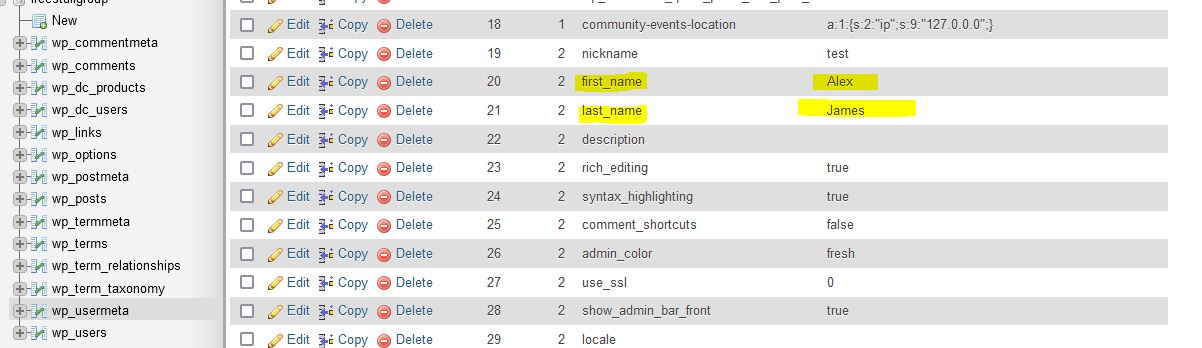
Thanks
-
AuthorPosts