Something wrong with the connection to metabox.io. Please try again later.
Support › Meta Box AIO › Something wrong with the connection to metabox.io. Please try again later.Resolved
- This topic has 10 replies, 2 voices, and was last updated 3 months, 3 weeks ago by
Yves.
-
AuthorPosts
-
November 28, 2025 at 10:54 AM #49430
Yves
ParticipantGreetings,
I have “AppSumo Tier 2 (all extensions, 10 sites LTD)“ since Apr 12, 2021.
I am looking to add Meta Box AIO to couple of my sites.
I don't see any option to add new domains.
Also, when trying to add my license in admin at:
https://mysite.com/wp-admin/admin.php?page=meta-box-updater,
it returns this error:
“Something wrong with the connection to metabox.io. Please try again later.
Please enter your license key to enable automatic updates for Meta Box extensions.
To get the license key, visit the My Account page on metabox.io website. If you have not purchased any extension yet, please get a new license here.“I tried the same process with all plugins at OFF and... still no success.
Wish you could fix this for me.
Kind Reagrds,
November 28, 2025 at 10:59 AM #49431ParticipantNovember 28, 2025 at 10:50 PM #49434Peter
ModeratorHello Yves,
Thanks for reaching out.
I'm not sure what's wrong on the License page on your site, but you can use the workaround by adding the code below to the file wp-config.php to activate license key by code
https://docs.metabox.io/updates/#can-i-define-the-license-key-via-a-constant-in-wp-configphpdefine( 'META_BOX_KEY', 'ABCDEFGHIJKLMNOPQRSTUVWXYZ123456' ); // Your Meta Box license key.Then you can try with UI option later.
November 29, 2025 at 12:29 AM #49435ParticipantThank you Peter for your help. Much appreciated.
Clearing the transients and activating the key by the wp-config.php works perfect on both sites: A and B.
On site A, I can see the Extensions page while on Site B I can't.Site A:
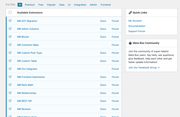
Site B: Nothing
Site A: Meta Box Menu
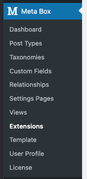
Site B: Meta Box Menu
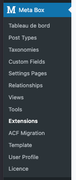
I am puzzled...
November 29, 2025 at 12:41 AM #49437ParticipantSorry. No option to delete my useless last post
December 1, 2025 at 10:36 PM #49441ModeratorHello,
Can you please share the whole screen when you are on the Extensions page on site B?
December 2, 2025 at 10:34 AM #49452ParticipantDecember 2, 2025 at 10:36 AM #49453Participant
 December 2, 2025 at 10:39 AM #49454December 2, 2025 at 10:31 PM #49460Moderator
Hello,
Please share your site admin account by submitting this contact form https://metabox.io/contact/
I will take a look.Thank you.
December 3, 2025 at 1:05 PM #49468ParticipantHi Peter,
Thank you for your last reply.
For an unknown reason, everything is now behaving as expected by using your tip in comment #49434:
https://support.metabox.io/topic/something-wrong-with-the-connection-to-metabox-io-please-try-again-later/#:~:text=10%3A50%20PM-,%2349434,-PeterMy wishes for this forum would be:
01. Possibility to post screenshots directly;
02. Have the possibility to edit/delete a comment.Thank you again Peter for your kind support.
You can now please close this thread.Kindly,
Yves
-
AuthorPosts


- You must be logged in to reply to this topic.