Error in select Tree Taxonomy
- This topic has 12 replies, 3 voices, and was last updated 7 years, 8 months ago by
[email protected].
-
AuthorPosts
-
December 12, 2018 at 5:13 AM #12609
[email protected]
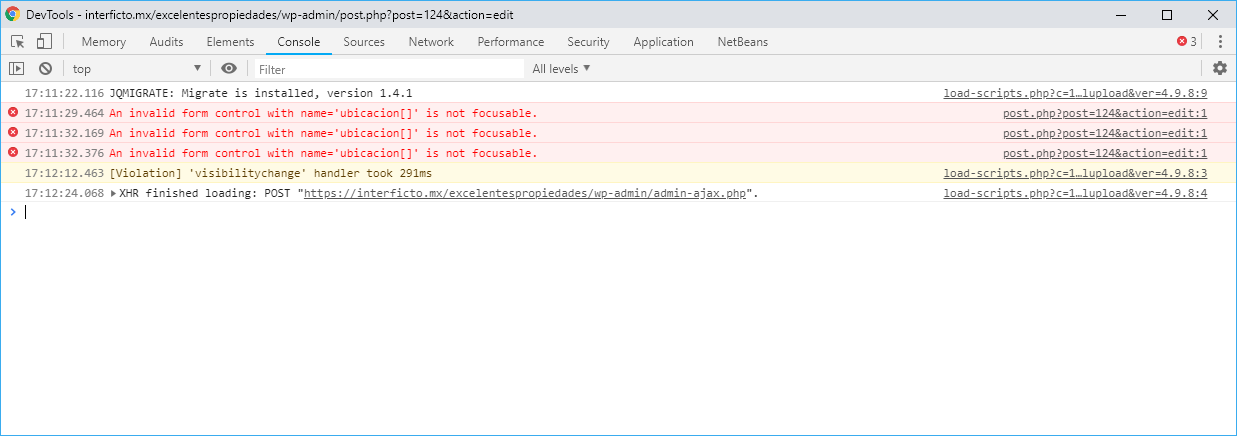
ParticipantHello, i am having one error selecting a taxonomy using select tree, when i select the taxonomy i can't save the post. Please see (javascript error in console):
I try delete taxonomy and term but the issue persist
December 12, 2018 at 5:01 PM #12617Farheen
ParticipantHello
Can you please share your code too and where you are adding the code.
Thanks
December 15, 2018 at 7:02 AM #12691ParticipantI am using Meta box builder and meta box custom post type.
The code por custom fields
https://ghostbin.com/paste/rrkg9
The code for the taxonomy
https://ghostbin.com/paste/trpmv
The code for the Custom Post type:
December 18, 2018 at 10:19 AM #12717ParticipantHello any new about this
December 19, 2018 at 8:55 AM #12732Anh Tran
KeymasterHi,
Looks like the
requiredattribute causes the issue. I tested your code and see that when you set the fieldrequired, you have to select the terms for all dropdowns in the select tree before saving posts. So, if that's not your intent, you should remove therequiredattribute.December 19, 2018 at 10:04 AM #12734ParticipantHello, it seems to be a bug of your plugin. The problem is when for example. The taxonomy has some term nested in 3 levels, but it also has other nested terms in only two levels. Then The validation of the abligatory field fails because apparently it is waiting for a third level, even though it should not be like that.
Please look at my video, you will see that the term "Sab" has no children, so there is no way to select a third level.
http://recordit.co/UzCRcevJS1December 19, 2018 at 4:14 PM #12735KeymasterThanks a lot for your video. You're right about the nesting levels. It's a bug and I've just fixed on Github: https://github.com/wpmetabox/meta-box/. Please take a look.
December 20, 2018 at 10:11 AM #12749ParticipantHello, sorry, i don't know many about gihub, i can't see it. How to fix my metabox installation?
December 20, 2018 at 10:49 AM #12750KeymasterYou can download the latest version here: https://github.com/wpmetabox/meta-box/archive/master.zip
And on your site, deactivate and remove Meta Box. Then re-install it using the downloaded zip file.
January 10, 2019 at 2:10 AM #12969ParticipantSorry for delay bu it doesn't work for me, please see the video:
http://recordit.co/z1B0MmMuCNCan you help me please, I removed the current version and i used the zip taht you share.
January 10, 2019 at 10:49 PM #12975ParticipantHello, any new about this? is a bug, can you help me please?
January 14, 2019 at 10:12 AM #13021KeymasterHi, can you clearing the browser cache and try again with the latest file from Github? The fix requires new JS file, which needs to clear browser cache.
January 15, 2019 at 8:22 PM #13031ParticipantOk, sorry was my mistake I cleares the cahce and this work.
Thank you very much
-
AuthorPosts
- You must be logged in to reply to this topic.